


Outline:
- Introduction
- AI vs. Well-Tuned Algorithms: Main Differences
- Algorithms vs. AI: Popular Use Cases and How They Perform in Each One
- The Reality Check
- BIM Tool Adoption: Things To Consider When Implementing
- Key Recommendations on When to Choose Algorithms vs. AI in BIM
Introduction
The conversation around AI in BIM is growing rapidly, but definitions often get blurred. The issue is the following: these days, many tools marketed as AI-based are actually powered by powerful yet traditional algorithms. Understanding the difference matters, especially when choosing what to adopt in production environments.
To clear up these confusing aspects once and for all, the ORIGIN team has been meticulously testing both AI and non-AI solutions. In this article, we’ll break everything down in practical terms, with real examples and takeaways from hands-on testing that reflect everyday BIM challenges.
AI vs. Well-Tuned Algorithms: Main Differences
Both AI and algorithm-based tools deserve their spotlight in modern BIM workflows, but each brings different strengths to the table. Explore them in the table below.
| Algorithms | AI |
| Deterministic, rule-based | Learns from data |
| Predictable, repeatable | Adaptive, context-aware |
| Great for repetitive, stable tasks | Ideal for complex, ambiguous, or variable tasks |
| Executes instructions exactly as defined | Makes decisions based on patterns, not rules |
| Cannot understand the meaning or intent | Understands semantic context and relationships |
In simple terms, algorithms follow fixed rules and work best for predictable or repetitive tasks. AI, in contrast, learns from data and adapts to context. So, here’s the key difference: algorithms do exactly what they’re told, while AI aims at understanding patterns and providing inputs for complex or unclear situations.
In particular, examples of algorithmic automation often mistaken for AI include:
- Automatic generation of duct or piping routing based on clash-free predefined rules;
- Auto-dimensioning tools that follow strict heuristics;
- Structural element placement based on rule sets (joist spacing, rebar patterns, etc.);
- Clash detection prioritization using weighted thresholds.
These tools feel smart because they dramatically reduce manual work, but they are still deterministic and predictable (and, therefore, do not fall into the AI category).
Let’s review some specific examples of solutions working on well-tuned algorithms, and how well they benchmark against AI.
Undet

Undet empowers Revit point cloud users to enhance the Scan-to-BIM process, increase productivity, and level up accuracy. Doing so, this tool is designed to reduce the manual work required to transform point cloud data into BIM models by nearly half.
How Undet Works
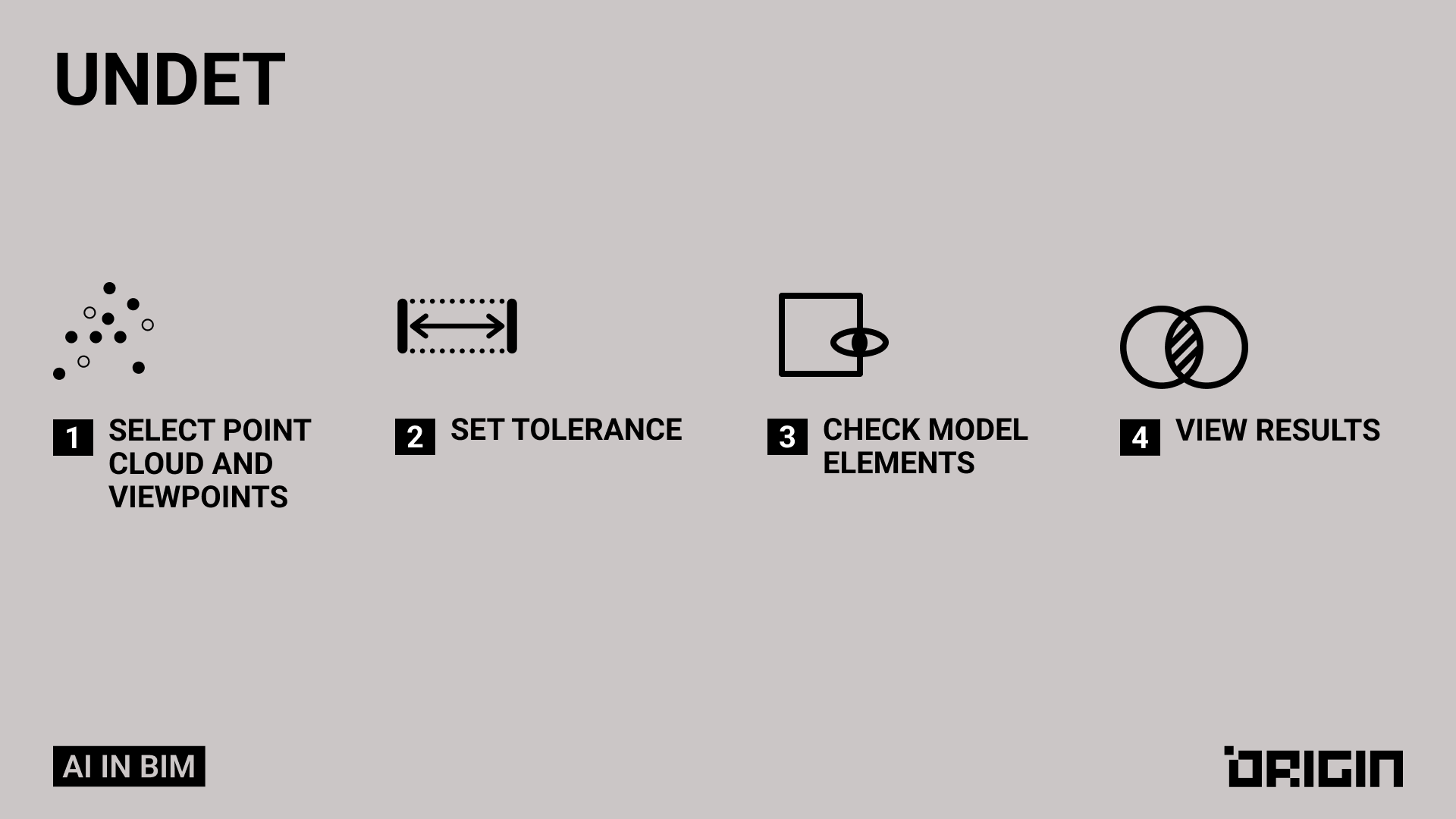
- Step 1 — Import the point cloud into Revit, SketchUp, or AutoCAD via the Undet plugin.
- Step 2 — Adjust visibility and sections to manage the point cloud efficiently.
- Step 3 — Use Undet tools (Fit Wall & Column, Fit Opening, Profile Maker) to model BIM elements directly from the cloud.
Testing and Conclusions
Our team has tested this plugin and drawn the following conclusions:
Although this plugin was initially expected to use AI for detecting and recognizing elements in a project, a closer examination reveals that it actually relies on well-defined algorithms, which can easily be mistaken for AI functionality.
Undet is useful for verification tasks, but less convenient for working directly with point clouds – in such cases, multiple additional steps are required to generate views such as sections, floor plans, and 3D models. Besides, its performance depends on the quality of the point cloud, and verification is not possible with scans lacking viewpoints.
| Pros | Cons |
| ✔️ Accelerated point cloud to BIM conversion with higher accuracy
✔️ Intuitive tools for simplified modeling
✔️ Supports various formats like *.E57, *.RCP/RCS, *.PTX, etc
✔️ Integrates well with common workflows and diverse datasets
| ❌ Learning curve for first-time users
❌ Handling very large point clouds can affect performance
❌ Works mainly within supported CAD/BIM environments, not standalone
❌ Limited automation compared to some AI-driven competitors
❌ Licensing costs may be high for small teams
|
Environment for REVIT

Environment is a platform that enables landscape and site design directly within the Revit workspace, without the need for additional software or programming skills.
How Environment Works
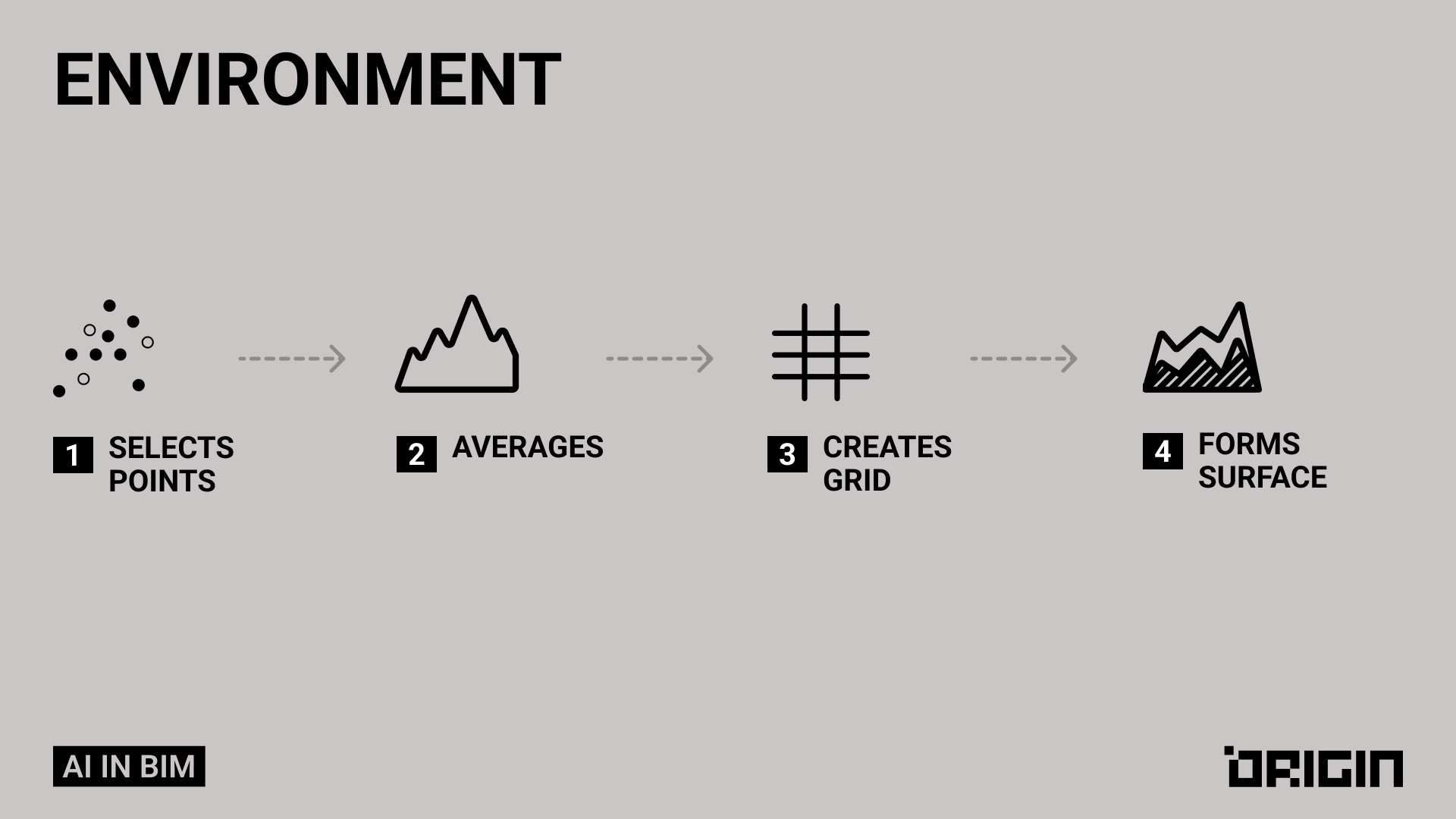
- Step 1 — Import survey data (CAD, Civil 3D, or point clouds) into Revit.
- Step 2 — Use Environment tools to generate a base topography / Toposolid directly in your model.
- Step 3 — Shape the terrain and hardscape using the Environment’s terrain and slab tools to match real site conditions.
- Step 4 — Add site elements and documentation (place walls, curbs, planting areas, furniture, etc.) and let Environment automatically generate contours and 2D views directly in Revit.
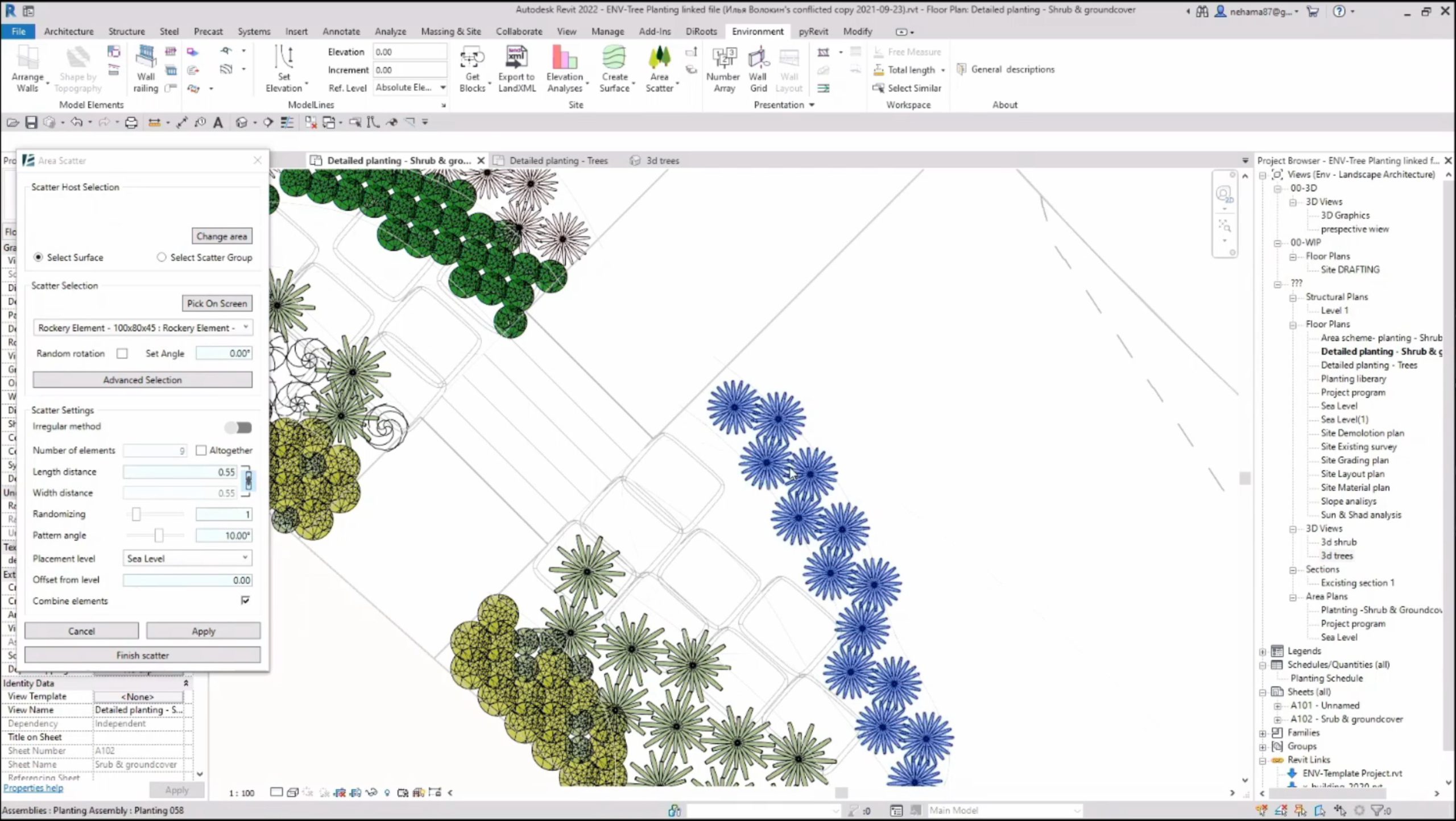
Our team has tested this plugin and drawn the following conclusions.
Conclusion: As AI in BIM is still a developing topic, sophisticated algorithmic workflows in plugins can often be confused with AI. Environment for Revit is a well-structured plugin that does not use AI, as confirmed by the developers. Nevertheless, it is a valuable tool for the automatic generation and modification of large landscape areas, providing efficient solutions for terrain modeling and site design.
| Pros | Cons |
| ✔️ 40+ landscaping tools for topography, roads, and slope analysis
✔️ Easy CAD import into Revit for accurate collaboration
✔️ Slope and elevation visualization for better design decisions
✔️ Automated workflows reduce manual effort
| ❌ Limited mainly to Revit workflows
❌ Can slow with large terrain models
❌ Licensing cost may be high for occasional users
❌ May feel overwhelming for beginners
|
Algorithms vs. AI: Popular Use Cases and How They Perform in Each One
MEP Routing
Key difference: Algorithms follow rules, AI learns patterns.
Clash-free routing relies on predefined rules such as shortest-path logic, offsets, and fixed clearances, producing predictable results based solely on these constraints.
In turn, true AI learns optimal routing patterns from large sets of past projects and dynamically adapts to building type, system density, and real-world installation constraints.
Let’s look at a specific example:
- In a high-density ceiling zone, a rule-based algorithm would route a duct in the mathematically shortest clash-free path. AI, however, identifies that electricians will later install cable trays in that zone. Using pattern recognition from previous projects, it reroutes the duct slightly upward and to the side to prevent downstream conflicts and reduce rework.
- When routing ductwork in a hospital corridor, AI recognizes that medical gas lines typically take priority in ceiling space and adjusts the duct path accordingly, even if the shortest path rule suggests otherwise.
Dimensioning & Annotation
Key difference: Algorithms interpret geometry, AI understands semantics.
Auto-dimensioning tools place dimensions using strict geometric heuristics, focusing only on shapes, distances, and edges without understanding the element’s purpose.
In contrast, AI understands the semantic meaning of elements. For example, it can distinguish a load-bearing structural wall from a lightweight partition, recognize door openings as functional elements, and identify which dimensions are critical for fabrication versus those needed only for layout.
Structural Element Placement
Key difference: Algorithms repeat patterns; AI optimizes outcomes.
With non-AI algorithms, structural elements like joists or rebar are placed according to rule sets, spacing tables, and prescriptive design patterns.
AI, in turn, proposes structural layouts based on several variables:
- The expected live load patterns from similar buildings;
- Vibration data from comparable floor systems;
- Historical issues (e.g., excessive deflection in certain spans);
- Material availability and cost trends;
- The contractor’s preferred installation methods.
Let’s review a specific scenario.
In a long-span floor system, a rule-based algorithm will simply apply a standard joist spacing (say 400 mm on center), because that’s what the table or template dictates.
In this case, AI might behave differently. Using this context, AI could also tighten spacing in high-vibration areas (near mechanical rooms), widen spacing in low-stress areas to reduce steel tonnage and cost, or adjust rebar patterns around openings based on predicted cracking zones, to name a few.
Clash Detection
Key difference: Algorithms detect issues; AI forecasts them.
In this case, rule-based clash detection identifies conflicts and ranks them using fixed thresholds such as distance or severity.
In a real-world scenario, AI would go further by understanding context and suggesting practical resolutions. AI is able to rank a list of meaningful risks as well as complete with resolution suggestions and impact estimates. See the practical example below illustrating this process.
| Rule-Based Algorithms | AI |
| Flags 300 clashes and ranks them only by penetration distance | Identifies 20 truly critical clashes based on corridor congestion and installation sequencing |
| Treats all clashes as equally important | Predicts delays (e.g., 2–3 days if ducts are installed before sprinklers) |
| Offers no context-aware suggestions | Suggests practical fixes (e.g., lower the cable tray, not reroute the duct) |
| Cannot interpret installation impact | Deprioritizes clashes above accessible ceiling panels |
| Misses compliance risks unless explicitly programmed | Flags potential fire-stopping violations near shaft walls |
Scan-to-BIM Processing
Key difference: Algorithms see points; AI sees objects.
Traditional point-cloud algorithms convert raw scan data into surfaces by detecting planes, edges, and geometric patterns. They focus only on the shape of the points. Meaning, they can create a wall plane but have no understanding that it is a wall, where it starts/ends, or what openings belong to it.
AI, on the other hand, recognizes actual building elements (walls, doors, beams, columns, ceilings, etc.). Thus, even when scans are noisy, partially occluded, cluttered with furniture, or captured at awkward angles, it’s able to do the job.
Let’s take an example of a renovation project where a hallway scan includes:
- A wall covered by bookshelves;
- An open door partially blocking the view;
- Pipes running along the ceiling;
- A beam that appears jagged due to low-resolution scans.
In such a case, algorithms commonly detect a planar surface but cannot tell where the wall is interrupted by a door. They might misread a noisy beam as part of the ceiling, and generate a continuous surface where bookshelves block the scan, needing manual cleanup.
AI, in contrast, can infer the full wall behind the bookshelves, detect the partially hidden door opening, distinguish the ceiling pipe from structural elements, and more. Based on its understanding of typical beam geometry and patterns learned from many past scans, it can accurately reconstruct the beam despite noise.
The Reality Check
It might all look good on paper, but how realistic is it?
Based on our testing and market benchmarking, the following points stand out:
- AI can assist routing today and reduce rework, but true “learned intelligence” across many disciplines is just beginning to mature;
- True intent-aware AI annotation is not fully solved yet;
- Contractor-aware structural AI is still developing;
- Accurate delay prediction (e.g., “2–3 days impact”) is still mostly prototype-level research;
- Automated resolution suggestions are improving, but not fully reliable.
Hence, while many capabilities are already practical today, some still remain highly dependent on data quality and model consistency limitations. Understanding this can help approach AI adoption with better consideration and insight.
BIM Tool Adoption: Things To Consider When Implementing
A few simple tips can go a long way. Explore some key recommendations by ORIGIN experts below.
- Combine rule-based automation with AI
Instead of relying on one method, try using the best of the two worlds. Rules are great when everything is clean and predictable, but real projects rarely are. Let algorithms handle the basics, and then test out AI to focus on optimizing, predicting, or understanding intent.
- Expect partial automation and design workflows accordingly
While, depending on the solution’s robustness, AI may automate 50-90% of a task, the rest still needs expert review. Therefore, don’t end-to-end autonomy and plan for human-in-the-loop checks.
- Adopt AI incrementally (starting with high-impact use cases)
Begin with tasks that generate consistent errors, require repetitive manual effort, and have clear ROI. This way, you’ll be able to minimize risks while still capturing some efficiency gains.
Key Recommendations on When to Choose Algorithms vs. AI in BIM
Eventually, your decision might depend on your specific workflows, project type, how much variability you deal with day to day, and other factors.
Based on our experience testing these tools in real-life scenarios, we’ve compiled some pointers on where each option might work best for you. Keep in mind these are subjective and reflect the ORIGIN team’s perspective, but they’re the approach we’d take ourselves.
With this in mind, well-tuned algorithms can be a good fit when:
- The task follows repeatable logic (dimension placement, spacing rules, clash thresholds, etc.);
- You need to follow the “same input → same result” flow;
- The constraints are well understood and stable;
- Speed and predictability matter more than flexibility;
- There’s no large dataset to learn from.
AI, in turn, can be efficiently used in these scenarios:
- The cases involve ambiguity and require interpretation;
- The task requires understanding context or intent;
- Rules alone cannot capture the complexity (for example, in cases like multi-variable routing, error detection in messy models, etc.);
- You need predictions or recommendations on top of the automation;
- You want solutions that improve accuracy over time.
At ORIGIN, we continuously test new solutions, workflows, and modern approaches to stay ahead of the curve. This ongoing experimentation helps us deliver excellence to our clients and provide guidance on what truly works in the BIM environment today.
Reach out to us to see how we can empower your BIM project needs.
