


Outline:
- Introduction to AI in BIM Modeling
- Currently Available AI Tools for BIM
- Overview of the Top AI Tools
- Conclusions
Introduction to AI in BIM Modeling
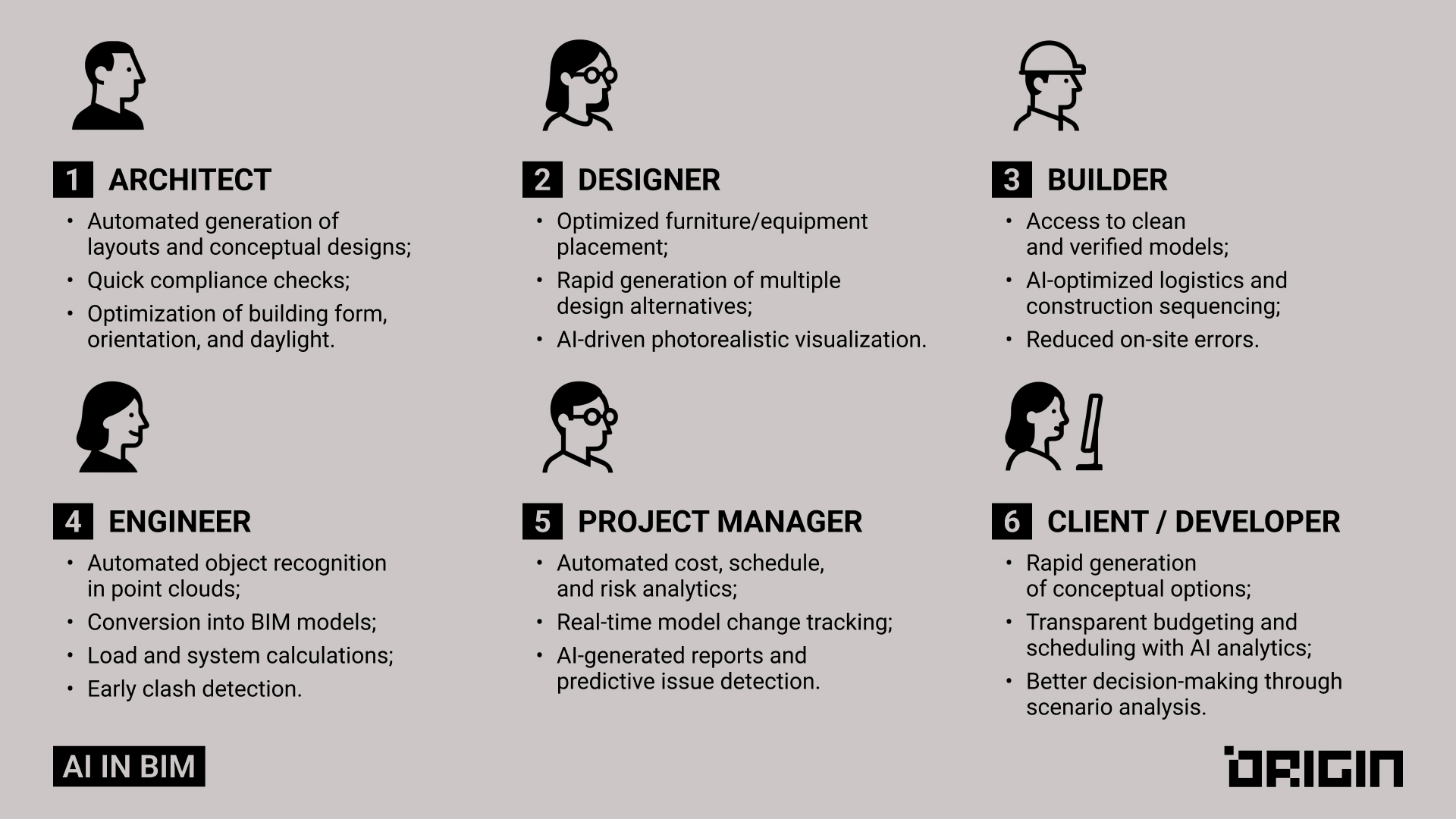
In recent years, artificial intelligence has been increasingly integrated across diverse industries, and BIM processes are no exception. The complex and data-intensive nature of BIM makes it a natural candidate for AI-driven enhancements.
A growing ecosystem of AI-powered tools – plugins, extensions, standalone platforms, in-platform integrations – is currently transforming industry practices. While some solutions are already mature enough for daily use, there are lots of beta-stage ones that promise significant advancements in the near future, too.
So, how can professionals benefit from AI, and what are the best practices to leverage it efficiently? This article examines exactly that, analyzing notable AI applications within the BIM sectors as well as real-life examples, best practices, and considerations.
Currently Available AI Tools for BIM
*with integrations for Revit
| Name | Description | Application |
| Aurivus | AI recognition and classification of objects in point clouds | Scan auto-segmentation, speeding up modeling |
| PlanFinder | AI-based search and extraction of elements from PDF/2D drawings | Conversion of drawings to BIM, plan search |
| WiseBIM | AI conversion of 2D drawings into BIM models | Automatic creation of Revit models from DWG/PDF |
| Environment AI | Automation of scan data analysis and processing | Object classification, noise filtering |
| Veras AI | Generative visualization of interiors/exteriors from Revit | Fast AI renders and design concepts |
| Autodesk Forma | AI site analysis and parametric optimization | Analysis of sunlight, wind, noise, and density |
| Revit Generative Design | Parametric generation of design options | Optimization of layouts and forms |
| TestFit | Automatic generation of layouts | Rapid design concepts for residential complexes |
| Naviate AI | Automation of Revit tasks using AI | Standard checking, auto-filling of parameters |
| VIM | AI analysis of large BIM models | Performance optimization, analytics |
| ClearEdge3D EdgeWise | Automatic modeling of pipes and structures | From point clouds to Revit |
| AirWorks | AI generation of 3D models from aerial imagery and LiDAR | Fast creation of topographic maps and building outlines |
| BricsCAD BIM AI Assist | AI assistant in BricsCAD for BIM tasks | Auto-classification and model correction |
| Archistar AI | Land plot analysis and building concept generation | Urban planning analysis, preliminary design |
| Constru | AI construction monitoring via photos and videos | Comparison with BIM, progress tracking |
| Qbiq AI | Automatic generation of office layouts | Fast conceptual design |
| OpenSpace AI | Automated 360° photo capture and BIM comparison | Construction monitoring |
| nPlan | Construction schedule forecasting | Risk analysis based on past projects |
| ALICE Technologies | AI optimization of construction schedules | Resource and schedule optimization |
| Doxel AI | Automated construction quality control | Laser scanning + AI analytics |
| Buildots | AI monitoring with helmet-mounted cameras | Progress comparison with BIM |
| Pointly | AI tool for object recognition in point clouds with BIM export | Used to convert scans into BIM models for reconstruction and utilities mapping |
| Hypar | Cloud-based generative design platform with AI automation | Enables architects to quickly test and optimize building design options |
| Skema | AI-driven layout generation directly inside Revit | Helps architects speed up early-stage planning and space optimization |
| Kreo | AI software for cost estimation and construction planning with BIM links | Applied for budget forecasting, scheduling, and resource management |
| ArkDesign | An AI tool for concept design generation considering codes and density | Used in feasibility studies, massing design, and early project proposals |
| Laiout | AI-powered space planning and furniture placement tool | Speeds up office layouts, interiors, and residential planning |
| ArchiLabs | AI assistant with scripting and a chatbot for Revit task automation | Helps automate repetitive workflows and improve BIM efficiency |
| BIMLOGIQ Copilot | Natural language AI assistant for Revit task automation | Let’s teams automate modeling and documentation without coding |
| usBIM.codesign | AI-enhanced rendering tool for Revit and BIM models | Creates photorealistic visuals for presentations and interior design |
Overview of the Top AI Tools
By leveraging AI, professionals can benefit from its advanced capabilities in numerous areas:
- Education and training;
- Workflow automation;
- Design optimization and speed of iterations;
- Predictive analytics and data-backed insights for better decision-making;
- Project management, and more.
There are just a few examples, as the capabilities continuously expand and new ways of impact are discovered.
In this section, we’ll review AI tools that our team has meticulously tested in real projects. The list below features the tools that are most suitable for the tasks carried out by BIM teams.
1. Aurivus

Aurivus specializes in training neural networks to convert point clouds into digital building models. This helps enhance the accuracy and efficiency of modeling processes in construction and architecture.
The company’s AI platform offers a unique blend of manual modeling and AI-augmented capabilities. Since it automatically recognizes and recreates in-model families (from walls and floors to pipes and trusses), Aurivus could be highly helpful for PointCloud to BIM-modelers. It can also clean point clouds, thus reducing their time and effort.
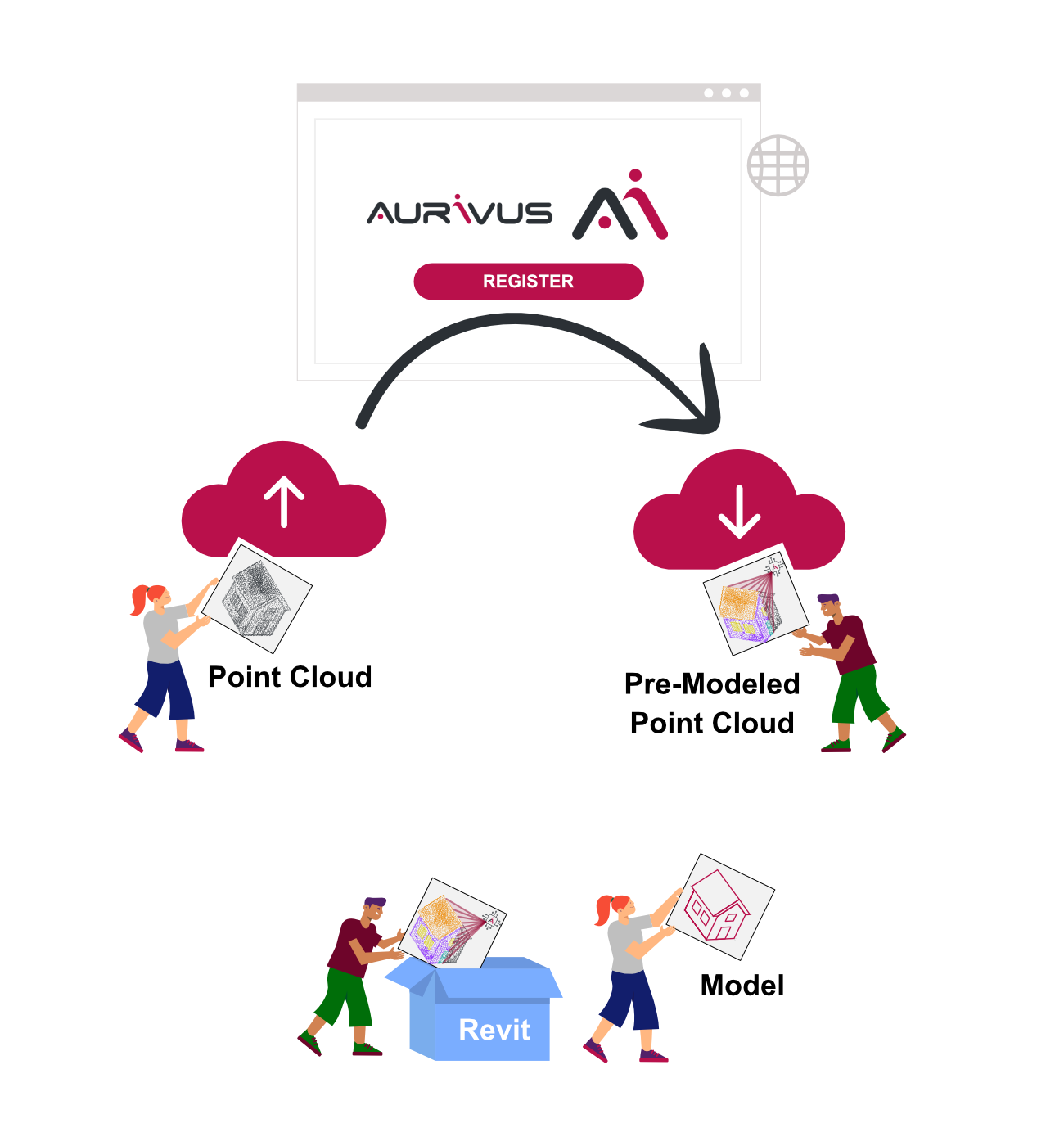
How Aurivus AI Works
[image source]
- Step 1 — Upload the point cloud to Aurivus AI.
- Step 2 — AI generates a Pre-Modeled Point Cloud with key elements detected.
- Step 3 — Open the file in Revit via the Aurivus plugin to continue modeling.
Testing and Conclusions
After testing this plugin, our team has drawn the following conclusions:
Aurivus AI is a very interesting and promising project with clear advantages, particularly its ease of use and fast performance. However, several drawbacks still prevent its full use in real projects, requiring additional verification and adjustments. In the meantime, we will continue to follow the development of this technology, as we find it both promising and worth watching.
| Pros | Cons |
| ✔️ Simplified, faster modeling from point clouds
✔️ Intuitive plugin interface
✔️ Fast performance on high-quality scans
✔️ Modeling flexibility — easy to enable/disable objects of point clouds
| ❌ High licensing cost
❌ Trial version doesn’t allow full functionality testing
❌ Struggles with low-quality point clouds
❌ Issues with wall connections
❌ Low Level of Detail, requires manual verification and adjustments
❌ Limited compatibility with broader BIM toolchains
❌ Added rework required |
2. PlanFinder

PlanFinder is a plugin for Autodesk Revit that utilizes AI technologies for automatic room layout generation. It enables architects and designers to quickly create and customize floor plans, thus significantly accelerating the design process.
How PlanFinder Works:
The algorithm is based on a machine learning model specifically trained to generate floor plans. The AI was trained using room layout data, including standard room sizes for different regions of Europe.
Testing and Conclusions
Our team has tested this plugin and drawn the following:
First and foremost, the PlanFinder plugin is likely well-suited for architects who design floor plans from scratch and need to generate a large number of layout options without spending too much time.
However, consider that refining a floor plan after using the plugin can take more time than manually creating a layout directly from the point cloud. Because of this, for BIM specialists involved in the building’s modeling based on point clouds, this plugin will not be useful.
| Pros | Cons |
| ✔️ Simple, accessible interface
✔️ Near-instant layout generation
✔️ Provides 1–24 different layout options per case
✔️ Convenient to create a custom layout library
✔️ Available across multiple platforms( Autodesk Revit, Rhinoceros 3D, Grasshopper 3D) | ❌ Additional refinement of generated layouts can take more time than manual work
❌ Limited usefulness beyond architects designing floor plans from scratch
❌ Not suitable for working with point clouds |
3. WiseBIM

WiseBIM AI for Autodesk Revit is a plugin that uses AI to automatically convert 2D building plans into a 3D Revit model. This way, it’s designed to significantly simplify and accelerate the process of creating BIM models based on existing 2D plans.
How WiseBIM works:
- Step 1 — Import an architectural 2D plan of your level into Revit® (supported formats: DWG, DXF, PDF, JPEG, TIFF, PNG).
- Step 2 — Set the scale of the imported image.
- Step 3 — Select the image and click the WiseBIM Detection button in the Add-Ins menu.
- Step 4 — Define a few parameters (e.g., wall height, families) and run the automatic detection.
- Step 5 — Within seconds, the Revit® model is generated with elements automatically created.
Testing and Conclusions
Our team has tested this plugin and concluded the following:
The plugin is excellent for quickly creating a 3D building model from 2D plans if the building plan is of good quality (preferably, in DWG or PDF format). It saves a lot of time on generating wall sizes and accurately detects the width of doors and windows.
However, we’ve identified several drawbacks and inconsistencies that require manual fixing, such as:
- The plugin sometimes misinterprets the swing direction of doors;
- Occasional inaccuracies occur when connecting walls;
- Architectural elements like openings or curtain walls are not automatically identified;
- When using underlays based on point clouds, the plugin struggles to complete the task effectively, as point cloud quality does not meet its recognition requirements;
- The plugin allows only one type of window and one type of door to be set, which restricts design flexibility and requires manual adjustments.
All of this adds up to significant manual work and additional time spent on checking, correcting, and completing the model, making the tool less efficient from an automation perspective. In the meantime, we’ll be keeping an eye on the solution’s roadmap and the release of more advanced features.
| Pros | Cons |
| ✔️ Simple and accessible interface
✔️ Quickly processes 2D plans and automatically generates wall types
✔️ Option to disable windows, doors, floors, and room boundaries
✔️ Works with multiple underlay formats (DWG, PDF, JPEG) | ❌ Limited element recognition
❌ Accuracy issues
❌ High post-processing effort due to the need for manual checks & corrections
❌ Not effective with point clouds |
4. Veras
Veras is an AI-powered visualization application developed by EvolveLAB. It integrates with programs such as SketchUp, Revit, Rhinoceros, and Vectorworks, thus allowing users to use a 3D model as a basis for generating visualizations.
How Veras works:
As a Revit plugin, Veras integrates smoothly into your existing workflow without the need to switch between different software.
Testing and Conclusions
Our team has given Veras the following verdict:
Veras is best suited for quick visualizations, concept presentations, or commercial proposals — however, not the final, production-ready renders.
Veras proves efficient in the rapid creation of visually appealing renders and offers high flexibility through descriptive input. However, precise control over the final output is limited, and reproducing identical renders from different angles can be challenging due to the AI-based generation.
| Pros | Cons |
| ✔️ AI-driven visualization for rapid, realistic renders
✔️ Selective rendering on chosen regions
✔️ Consistent results with the same seed option
✔️ Geometry and material overrides for customization
✔️ Out-of-the-box presets for quick styles
✔️ Seamless Revit integration into workflow | ❌ Limited control over final output
❌ Inconsistent results when reproducing renders from different angles
❌ Not suitable for production-ready renders |
Other Tools to Streamline BIM Workflows
While the solutions reviewed above focus primarily on AI-driven or AI-assisted functionality, a number of powerful automation and efficiency-focused tools can significantly enhance BIM workflows even without full AI capabilities. Explore them in the table below.
| Tool | Category | Description | Capabilities |
| Undet | Well-tuned algorithm | Uses predefined rules for segmentation and geometry fitting rather than learning from data |
|
| Environment for Revit | Well-tuned algorithm | Automates terrain and landscape modeling with procedural logic |
|
| Auto BIM Route AI | Well-tuned algorithm | Automates MEP routing using rule-based pathfinding and constraints |
|
| Dynamo | Rule-based automation | Visual programming automation tool inside Revit |
|
| IdeateApps / pyRevit | Rule-based automation | Automation of Revit tasks through scripts & rule logic |
|
| Solibri | Rule-based checking | Uses predefined rule libraries for model quality validation |
|
| Revizto | Coordination automation | Centralized environment for BIM issue management |
|
| BIMTrack | Coordination automation | Streamlines project collaboration and model communication |
|
| Speckle | Interoperability automation | Open data exchange and conversion engine |
|
Conclusions
Analyzing the existing AI tools and plugins for Revit, it can be concluded that the use of artificial intelligence in BIM represents one of the most promising and rapidly developing directions.
The promise:
AI tools offer a range of undeniable advantages that encourage professionals to further explore, develop, and integrate these approaches into real-world projects. For instance, AI can significantly accelerate the generation of conceptual designs, automate object recognition in point clouds, optimize space layouts, and improve the accuracy of calculations at the early design stages.
Important considerations:
Nevertheless, this field still faces several limitations that hinder the large-scale adoption of AI solutions in practice.
Among the most critical challenges, these ones were noticed:
- The high cost of software products;
- The narrow specialization of certain tools is restricted to limited tasks;
- Difficulties in integrating them into existing workflows.
In particular, based on the tools our team attempted to implement, one of the major drawbacks was insufficient functionality of the built-in algorithms, which resulted in additional time expenditures for verification and manual adjustments.
The bottom line:
Considering the rapid pace of technological development and the growing demand for automation in the construction industry, it is reasonable to predict that in the near future, these tools will reach a qualitatively higher level.
Their application in BIM modeling is expected to become a standard practice, while the tools themselves will provide broader functionality, greater accessibility, and seamless integration with established design platforms. Therefore, it is crucial to closely monitor the progress in this domain in order to be prepared for its inevitable adoption in professional practice.
